


How to Inspect the Engine Air Cleaner/Filter
To inspect the air cleaner/filter, remove the filter from the vehicle and lightly shake the filter to release loose dust and dirt. If the filter remains caked with dirt, a new filter is required.
To inspect or replace the filter:
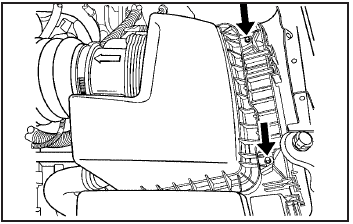
1. Remove the two screws on the top of the engine air cleaner/filter cover.
2. Lift up the outboard side of the cover at an angle while pulling toward you. This is necessary due to the two hinges located on the inboard side of the cover.
3. Remove the engine air cleaner/filter and any loose debris that may be found in the air cleaner base.
4. Inspect or replace the air filter element.
To reinstall the cover:
1. Align the two hinges located on the inboard side of the cover.
2. Push the cover slightly down and towards the engine to engage the tabs in the hinges and align the two screws.
3. Tighten the two screws on the top of the engine air cleaner/filter cover.
WARNING:
Operating the engine with the air cleaner/filter off
can cause you or others to be burned. The air
cleaner not only cleans the air; it helps to stop
flames if the engine backfires. If it is not there and
the engine backfires, you could be burned. Do not
drive with it off, and be careful working on the
engine with the air cleaner/filter off.
Notice: If the air cleaner/filter is off, a backfire can
cause a damaging engine fire. And, dirt can
easily get into the engine, which will damage it.
Always have the air cleaner/filter in place when you
are driving.
See also:
Conference Calling
Conference calling and three-way
calling must be supported on the
Bluetooth phone and enabled by the
wireless service carrier to work.
To start a conference while in a
current call:
1. Turn ...
Remote Keyless Entry (RKE) System Operation
The transmitter functions will work
up to 20m(65 ft) away from the
vehicle. On vehicles with remote
start the distance will be greater.
Keep in mind that other conditions,
such as those previ ...
Doing Your Own Service Work
WARNING
It can be dangerous to work on your vehicle if you do not have the proper knowledge,
service manual, tools, or parts. Always follow owner manual procedures and consult
the service manua ...