


How the System Works
LDW uses a camera located between the inside rearview mirror and the windshield to detect the lane markings.
 (Lane Departure Warning): To turn
LDW on and off,
press the LDW control, located by the exterior headlamp
control. An indicator on the control will light to indicate
that LDW is on.
(Lane Departure Warning): To turn
LDW on and off,
press the LDW control, located by the exterior headlamp
control. An indicator on the control will light to indicate
that LDW is on.
When the vehicle is started, the LDW symbol, located in the instrument panel cluster, will briefly come on to indicate that the light is operational.
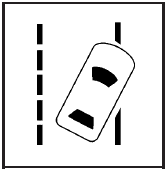
LDW only operates at speeds of 35 mph (56 km) or greater. If LDW is turned on when traveling at these speeds, the LDW symbol will appear green if the system detects a left or right lane marking. This symbol will change to amber and flash and three beeps will sound if you cross a detected lane marking without using the turn signal.
If the LDW symbol does not appear, LDW is not currently operating and will not warn you.
To change the volume of the warning chime, see Chime Volume under DIC Vehicle Customization for more information.
See also:
How to Check Power Steering Fluid
To check the power steering fluid:
1. Turn the key off and let the engine compartment
cool down.
2. Wipe the cap and the top of the reservoir clean.
3. Unscrew the cap and wipe the dipstick with ...
DIC Operation and Displays
The DIC has different displays which can be accessed by using the DIC buttons
on the turn signal lever, located on the left side of the steering wheel. The DIC
displays trip, fuel, and vehicle sys ...
Rear Compartment Fuse Block
The rear compartment fuse block, if equipped, is located on the left side of
the trunk behind a cover.
The vehicle may not be equipped with all of the fuses, relays, and features shown.
...