


Compass
Compass Operation
There is a compass display in the upper right corner of the mirror.
Compass Calibration
Press and hold  to activate the
compass calibration
mode. CAL displays in the compass window on the
mirror.
to activate the
compass calibration
mode. CAL displays in the compass window on the
mirror.
If after a few seconds the display does not show a compass direction, (N for North for example), there may be a strong magnetic field interfering with the compass.
Interference can be caused by a magnetic antenna mount, note pad holder, or similar object. If CAL displays in the compass window, the compass may need to be reset or calibrated.
The compass can be calibrated by driving the vehicle in circles at 5 mph (8 km/h) or less until the display reads a direction.
Compass Variance
The compass is set to zone eight. If you do not live in zone eight or drive out of the area, the compass variance needs to be changed to the appropriate zone.
To adjust for compass variance:
1. Find your current location and variance zone number on the following zone map.
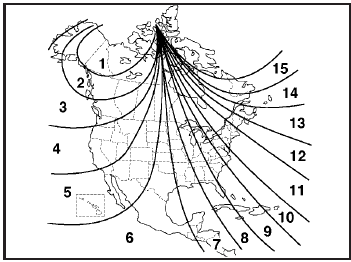
2. Press and hold until the
zone number displays.
The number shown is the current zone number.
3. Once the zone number displays, press
repeatedly
until the correct zone number displays. Stop pressing
the button and the mirror returns to normal operation.
If CAL appears in the compass window, the compass may need calibration. See “Compass Calibration” listed previously.
See also:
Secondary Latch System
Your vehicle has an underbody-mounted tire hoist
assembly equipped with a secondary latch
system. It is designed to stop the spare tire from
suddenly falling off your vehicle if the cable holding
...
Finding a Program Type (PTY) Station(RDS and XM™)
To select and find a desired PTY perform the
following:
1. Press the TYPE button to activate program
type select mode. TYPE and a PTY displays.
2. Turn the TYPE knob or press and release the
TY ...
If the Off Indicator is Lit for an Adult-Size Occupant
If a person of adult-size is sitting in the right front passenger seat, but the off indicator is lit, it could be because that person is not sitting properly in the seat. If this happens, use the fo ...