


Heated and Ventilated Seats
On vehicles with heated and ventilated seats, the ignition must be on to use the feature.
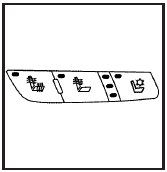
Driver’s Side Buttons shown
The buttons are located on the front doors.
 (Heated Seat Cushion and Seatback):
Press this
button to heat the seat cushion and seatback.
(Heated Seat Cushion and Seatback):
Press this
button to heat the seat cushion and seatback.
 (Heated Seatback): Press this button
to heat the
seatback.
(Heated Seatback): Press this button
to heat the
seatback.
 (Ventilated Seat Cushion and
Seatback): Press
this button to cool the seat cushion and seatback.
(Ventilated Seat Cushion and
Seatback): Press
this button to cool the seat cushion and seatback.
Press each button to turn on the desired feature. A light on that button will display indicating which feature is on.
There are three temperature settings for each feature.
A column of three lights next to the buttons will display which setting the feature is in: high, medium or low. Three lights indicate the highest setting, two lights indicate medium and one light indicates the lowest setting.
When you press a button, the feature will turn on at the highest setting. Each time you press the button, the feature will decrease one temperature setting.
To turn the feature off, keep pressing the button until the display lights turn off.
If your vehicle has remote vehicle start and is started using the remote keyless entry transmitter, the front heated seats will be turned on to the high setting if it is cold outside. See “Remote Vehicle Start” under Remote Keyless Entry (RKE) System Operation. When the key is inserted into the ignition and the ignition is turned on, the heated seat feature will turn off. To turn the heated seat feature back on, press the desired button.
See also:
Finding a Station
BAND: Press this button to switch between FM1,
FM2, AM, or XM1 or XM2 (if equipped). The
display shows the selection.
TUNE
: Turn this knob to select radio
stations.
SEEK
: Press either the ...
Backglass Wiper Blade Replacement
1. Lift the wiper blade assembly up and out of
the park rest position.
2. Pull the wiper blade assembly away from the
backglass. The backglass wiper blade will not
lock in a vertical position, s ...
When the System Does Not Seem To Work
Properly
Occasional missed alerts can occur under normal
circumstances and will increase in wet conditions.
The system does not need to be serviced due to an
occasional missed alert. The number of missed ...