


Steering Wheel Controls
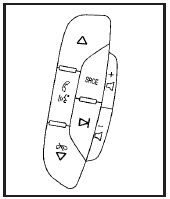
If equipped, these controls are located on the right side of the steering wheel.
 : Press to go to the next radio
station stored as a
favorite, or the next track, if a CD/DVD is playing.
: Press to go to the next radio
station stored as a
favorite, or the next track, if a CD/DVD is playing.
 : Press to silence the vehicle
speakers only.
: Press to silence the vehicle
speakers only.
Press again to turn the sound on. Press and hold longer than two seconds to interact with OnStar® or Bluetooth® systems.
 : Increases or decreases volume.
 : Press to go to the previous radio
station stored
as a favorite, the next track if a CD/DVD is playing,
to reject an incoming call, or end a current call.
: Press to go to the previous radio
station stored
as a favorite, the next track if a CD/DVD is playing,
to reject an incoming call, or end a current call.
SRCE: Press to switch between the radio, CD, and for vehicles with, DVD, front auxiliary, and rear auxiliary.
 : Press seek the next radio
station, or to select tracks
on a CD or DVD.
: Press seek the next radio
station, or to select tracks
on a CD or DVD.
For more information, see Audio Steering Wheel Controls.
See also:
Manual Rearview Mirror
To adjust the inside rearview mirror, hold the rearview mirror in the center
and move it to view the area behind the vehicle.
For vehicles with a manual rearview mirror, push the tab forward for da ...
Audio Output
Audio from the DVD player or auxiliary inputs may
be heard through the following possible sources:
• Wireless Headphones
• Vehicle Speakers
• Vehicle wired headphone jacks on the Rear
Sea ...
Interior
Perforated leather upholstery is standard, and heated front seats are
optional. The monochromatic interior features chrome accents and dark woodgrain
trim. Standard steering-wheel controls operate ...