


DVD Player Buttons (Without Sunroof)
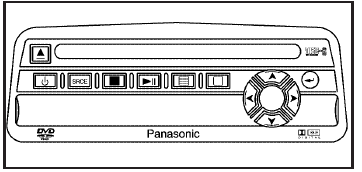
 (Power): Press this button
to turn the RSE
system on and off. The power indicator light
will illuminate when the power is on.
(Power): Press this button
to turn the RSE
system on and off. The power indicator light
will illuminate when the power is on.
 (Eject): Press this button
to eject a DVD or CD.
(Eject): Press this button
to eject a DVD or CD.
SRCE (Source): Press this button to switch between the DVD player and an auxiliary source.
 (Stop): Press this button
to stop playing,
rewinding, or fast forwarding a DVD or CD. Press
this button twice to return to the beginning of
the DVD.
(Stop): Press this button
to stop playing,
rewinding, or fast forwarding a DVD or CD. Press
this button twice to return to the beginning of
the DVD.
 (Play/Pause): Press this
button to start play
of a DVD or CD. Press this button while a
DVD or CD is playing to pause it. Press this button
again to continue the play of the DVD or CD.
(Play/Pause): Press this
button to start play
of a DVD or CD. Press this button while a
DVD or CD is playing to pause it. Press this button
again to continue the play of the DVD or CD.
 (Main DVD Menu): Press
this button to access
the DVD menu. The DVD menu is different on every
DVD. Use the up, down, left, and right arrow
buttons to move the cursor around the DVD menu.
(Main DVD Menu): Press
this button to access
the DVD menu. The DVD menu is different on every
DVD. Use the up, down, left, and right arrow
buttons to move the cursor around the DVD menu.
After making a selection press the enter button.
This button only operates when playing a DVD.
 (Set-up Menu): Press this
button to adjust the
color, tint, brightness, contrast, display mode,
and dynamic range compression. The dynamic
range compression feature can be used to reduce
loud audio and increase low audio produced by
some DVDs.
(Set-up Menu): Press this
button to adjust the
color, tint, brightness, contrast, display mode,
and dynamic range compression. The dynamic
range compression feature can be used to reduce
loud audio and increase low audio produced by
some DVDs.
To change a feature back to the factory default setting, press this button to display the feature, then press and hold this button. The default setting will appear on the display.
While playing an Audio or DVD disc, press and hold this button to display and to remove the track and time information.
 (Menu Navigation Arrows):
Use
the arrow buttons to navigate through a menu.
(Menu Navigation Arrows):
Use
the arrow buttons to navigate through a menu.
 (Enter): Press this
button to select the
choices that are highlighted in any menu.
(Enter): Press this
button to select the
choices that are highlighted in any menu.
See also:
Engine Coolant Temperature Gage
This gage shows the engine coolant temperature. If the
pointer moves towards the H (United States) or shaded in
thermostat symbol area (Canada), the engine is too hot.
A temperature indicator l ...
USB Port
For vehicles with a USB port, the
following devices may be connected
and controlled by the infotainment
system.
• iPods
• PlaysForSure Devices (PFDs)
• USB Drives
• Zunes™
• USB ...
Finish Damage
Any stone chips, fractures or deep scratches in the finish
should be repaired right away. Bare metal will corrode
quickly and may develop into major repair expense.
Minor chips and scratches can ...