


Programming Universal HomeRemote — Rolling Code
Rolling code garage door openers are used for garage doors produced after 1996 and are code protected. Rolling code means the coded signal is changed every time your remote control garage door opener is used.
Programming a rolling code garage door opener involves time-sensitive actions, so read the entire procedure before you begin. If you do not follow these actions, the device will time out and you will have to repeat the procedure.
Follow these steps to program up to three channels:
1. Press the two outside buttons at the same time for one to two seconds, and immediately release them.
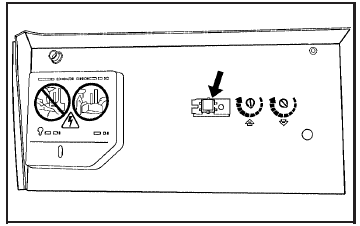
2. Go to the garage. Locate the garage door motor head and press and release the “learn” button.
After pressing the “learn” button, you have 10 to 30 seconds to complete Step 4 depending on your garage control unit. If you cannot locate the “learn” button, refer to the owners guide for your garage door opener.
3. Press and hold the button you would like
to use to control the garage door until the
garage door moves. The indicator light,
above the selected button, should slowly
blink. You may need to hold the button from
five to 20 seconds.
4. Immediately release the button when the
garage door moves. The indicator light will
blink rapidly until programming is complete.
5. Press and release the button again. The
garage door should move, confirming that
programming is successful and complete.
To program another device such as an additional garage door opener, a security device, or home lighting, repeat Steps 1 through 6, choosing a different function button in Step 4 than what you used for the garage door opener.
See also:
If the Off Indicator is Lit for an Adult-Size Occupant
If a person of adult-size is sitting in the right front passenger seat, but the off indicator is lit, it could be because that person is not sitting properly in the seat. If this happens, use the fo ...
Washing the Vehicle
To preserve the vehicle's finish, wash it often and out of direct sunlight.
Notice: Do not use petroleum based, acidic, or abrasive cleaning agents as they
can damage the vehicle's paint, m ...
Trip Odometer
The trip odometer can show how far the vehicle has been driven since the trip
odometer was last reset.
The trip odometer is accessed and reset through the Driver Information Center
(DIC). See Dri ...