


Programming Universal HomeRemote — Fixed Code
Fixed Code garage door openers are used for garage doors produced prior to 1996. Fixed code uses the same coded signal every time, which is manually programmed by setting DIP switches for a unique personal code.
Follow these steps to program up to three channels:
1. Remove the battery cover of the hand-held transmitter.
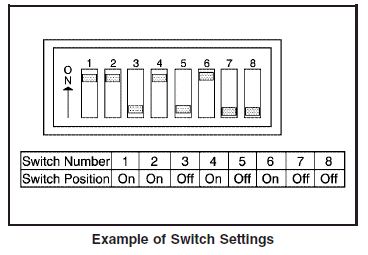
2. Write down the eight to 12 coding switch settings from left to right. When the switch is in the up position, write “on,” and when a switch is in the down position, write “off”.
If a switch is set between the up and down position, write “middle”.
3. Enter these positions into the Universal Home Remote System as follows.
Press and release all three buttons at the same time to put the device into programming mode.
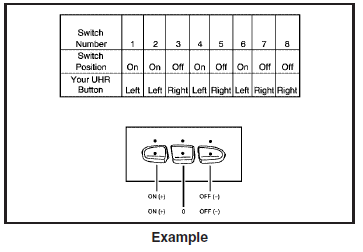
4. The indicator light will blink slowly. In order from left to right, and within two and one-half minutes, enter each switch setting into the Universal Home Remote System. Push one button for each switch as follows:
• Left button = “on” switch position.
• Right button = “off” switch position.
• Middle button = “middle” switch position.
5. After entering the switch settings, press and release all three buttons at the same time.
The indicator lights will turn on.
6. Press and hold the button you would like to use to control the garage door until the garage door moves. The indicator light above the selected button should slowly blink.
You may need to hold the button from five to 55 seconds.
7. Immediately release the button when the
garage door moves. The indicator light will
blink rapidly until programming is complete.
8. Press and release the button again. The
garage door should move, confirming that
programming is successful and complete.
To program another device such as an additional garage door opener, a security device, or home lighting, repeat Steps 1 through 8, choosing a different function button in Step 7 than what you used for the garage door opener.
See also:
3.6L V6 Engine
3.6L V6 Engine
1. Remove the screws on top of
the engine air cleaner/filter
housing.
2. Lift the filter cover housing away
from the engine.
3. Pull out the filter.
4. Inspect or replace th ...
When to Change Engine Oil
Your vehicle has a computer system that lets you
know when to change the engine oil and filter.
This is based on engine revolutions and engine
temperature, and not on mileage. Based on driving
c ...
Where to Put the Restraint
According to accident statistics, children and infants are
safer when properly restrained in a child restraint
system or infant restraint system secured in a rear
seating position.
We recommend ...