


Passenger Airbag Status Indicator
The vehicle has a passenger sensing system. See Passenger Sensing System for important safety information.
The instrument panel has a passenger airbag status indicator.
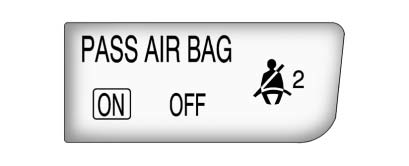
When the vehicle is started, the passenger airbag status indicator will light the words ON and OFF for several seconds as a system check.
Then, after several more seconds, the status indicator will light either the word ON or OFF to let you know the status of the right front passenger frontal airbag and seat-mounted side impact airbag.
If the word ON is lit on the passenger airbag status indicator, it means that the right front passenger frontal airbag and seat-mounted side impact airbag are enabled (may inflate).
If the word OFF is lit on the airbag status indicator, it means that the passenger sensing system has turned off the right front passenger frontal airbag and seat-mounted side impact airbag.
If, after several seconds, both status indicator lights remain on, or if there are no lights at all, there may be a problem with the lights or the passenger sensing system.
See your dealer for service.
 WARNING
If the airbag readiness light ever comes on and stays on, it means that something may be wrong with the airbag system. To help avoid injury to yourself or others, have the vehicle serviced right away. See Airbag Readiness Light for more information, including important safety information.
See also:
Pairing
A Bluetooth-enabled cell phone must be paired to the Bluetooth system and then connected to the vehicle before it can be used. See the cell phone manufacturer's user guide for Bluetooth functions befo ...
Steering, Suspension, and Chassis Components
Visually inspect front and rear suspension and steering system for damaged, loose,
or missing parts or signs of wear. Inspect power steering lines and hoses for proper
hook-up, binding, leaks, cra ...
Following Distance
Stay at least twice as far behind the vehicle ahead
as you would when driving your vehicle without
a trailer. This can help you avoid situations
that require heavy braking and sudden turns. ...