


Certification Label
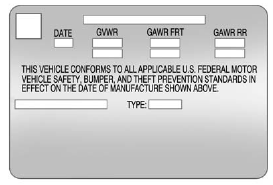
Label Example
A vehicle-specific Certification label, found on the vehicle center pillar (B-pillar), tells you the gross weight capacity of the vehicle, called the Gross Vehicle Weight Rating (GVWR). The GVWR includes the weight of the vehicle, all occupants, fuel, and cargo. Never exceed the GVWR for the vehicle, or the Gross Axle Weight Rating (GAWR) for either the front or rear axle.
And, if you do have a heavy load, you should spread it out. See “Steps for Determining Correct Load Limit” earlier in this section.
 WARNING
Do not load the vehicle any heavier than the Gross Vehicle Weight Rating (GVWR), or either the maximum front or rear Gross Axle Weight Rating (GAWR). This can cause systems to break and change the way the vehicle handles. This could cause loss of control and a crash. Overloading can also shorten the life of the vehicle.
If you put things inside the vehicle — like suitcases, tools, packages, or anything else — they will go as fast as the vehicle goes. If you have to stop or turn quickly, or if there is a crash, they will keep going.
WARNING
Things inside the vehicle can strike and injure people in a sudden stop or turn, or in a crash.
. Put things in the cargo area of the vehicle. In the cargo area, put them as far forward as possible. Try to spread the weight evenly.
. Never stack heavier things, like suitcases, inside the vehicle so that some of them are above the tops of the seats.
. Do not leave an unsecured child restraint in the vehicle.
. Secure loose items in the vehicle.
. Do not leave a seat folded down unless needed.
See also:
Checking Coolant
The vehicle must be on a level surface when checking
the coolant level.
The coolant level should be at or above the FULL
COLD mark when the engine is cold. The coolant level
should be above the ...
Oil Pressure Gage
The oil pressure gage shows the engine oil
pressure in psi (pounds per square inch) when the
engine is running. Canadian vehicles indicate
pressure in kPa (kilopascals).
Oil pressure may vary ...
STEP ON BRAKE TO
RELEASE PARK BRAKE
This message is displayed if you
attempt to release the electric
parking brake without the brake
pedal applied. See Parking Brake for more information. ...