


Rear Safety Belt Comfort Guides
This vehicle may have rear safety belt comfort guides. If not, they are available through the dealer. The guides may provide added safety belt comfort for older children who have outgrown booster seats and for some adults. When installed and properly adjusted, the comfort guide positions the belt away from the neck and head.
There is one guide, if equipped, for each outboard passenger position in the rear seat. To install a comfort guide to the safety belt:
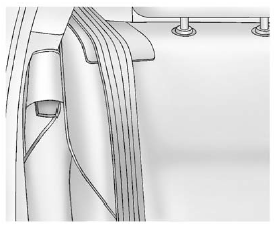
1. Remove the guide from its storage pocket on the side of the seat.
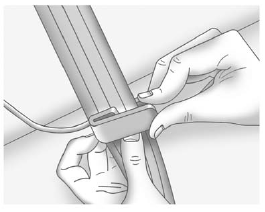
2. Place the guide over the belt, and insert the two edges of the belt into the slots of the guide.
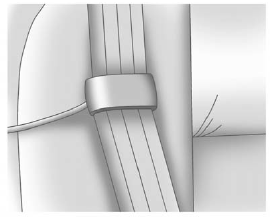
3. Be sure that the belt is not twisted and it lies flat. The elastic cord must be under the belt and the guide on top.
 WARNING
A safety belt that is not properly worn may not provide the protection needed in a crash. The person wearing the belt could be seriously injured. The shoulder belt should go over the shoulder and across the chest. These parts of the body are best able to take belt restraining forces.
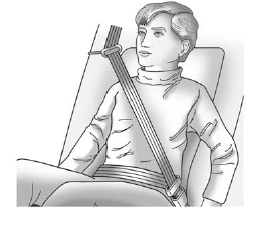
4. Buckle, position, and release the safety belt as described previously in this section. Make sure the shoulder portion of the belt is on the shoulder and not falling off of it. The belt should be close to, but not contacting, the neck.
5. To remove and store the comfort guide, squeeze the belt edges together so that the safety belt can be removed from the guide. Store the guide in its storage pocket on the seatback.
See also:
RDS (Radio Data System)
The radio may have RDS. The RDS
feature is available for use only on
FM stations that broadcast RDS
information. This feature only works
when the information from the radio
station is availa ...
Securing Child Restraints (Front Passenger Seat)
This vehicle has airbags. A rear seat is a safer place to secure a forward-facing
child restraint. See Where to Put the Restraint .
In addition, the vehicle has a passenger sensing system which is ...
Overview
The Buick Rendezvous, introduced in the spring of 2001 as a 2002 model year
vehicle and produced through the present, is a sport utility vehicle produced by
the Buick division of General Motors.
...