


Steering Wheel Controls
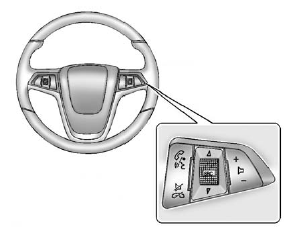
For vehicles with audio steering wheel controls, some audio controls can be adjusted at the steering wheel.
 : Press to interact with the available
Bluetooth, OnStar, or navigation system.
: Press to interact with the available
Bluetooth, OnStar, or navigation system.
 : Press to silence the vehicle speakers
only. Press again to turn the sound on. For vehicles with OnStar or Bluetooth systems,
press to reject an incoming call, or to end a current call.
: Press to silence the vehicle speakers
only. Press again to turn the sound on. For vehicles with OnStar or Bluetooth systems,
press to reject an incoming call, or to end a current call.
 : Press the thumbwheel to select
an audio source. Move the thumbwheel up or down to select the next or previous favorite
radio station, CD, or MP3 track.
: Press the thumbwheel to select
an audio source. Move the thumbwheel up or down to select the next or previous favorite
radio station, CD, or MP3 track.
 : Press + to increase or − to decrease
the volume.
: Press + to increase or − to decrease
the volume.
For more information, see Steering Wheel Controls .
See also:
Bluetooth®
For vehicles with an in-vehicle Bluetooth system, it
allows users with a Bluetooth enabled cell phone
to make and receive hands-free calls using the vehicle’s
audio system and controls.
The B ...
Infotainment Control Buttons
The buttons on the faceplate are
used to start primary functions while
using the infotainment system.
VOL/ (Volume/Power):
1. Press to turn the system on
and off.
2. Turn to adjust the volum ...
How to Detect a Tamper Condition
If is pressed and the
horn
sounds, an attempted break-in
occurred while the system was
armed.
If the alarm has been activated, a
message will appear on the DIC.
See Anti-theft Alarm ...