


OnStar Overview
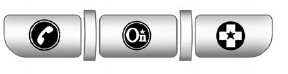
If equipped, this vehicle has a comprehensive, in-vehicle system that can connect to a live Advisor for Emergency, Security, Navigation, Connection, and Diagnostic Services.
The OnStar system status light is next to the OnStar buttons. If the status light is:
• Solid Green: System is ready.
• Flashing Green: On a call.
• Red: Indicates a problem.
Push  or call 1-888-4-ONSTAR
(1-888-466-7827) to speak to an
Advisor.
or call 1-888-4-ONSTAR
(1-888-466-7827) to speak to an
Advisor.
Push  to:
to:
• Make a call, end a call, or answer an incoming call.
• Give OnStar Hands-Free Calling voice commands.
• Give OnStar Turn-by-Turn Navigation voice commands.
Requires the available Directions and Connections service plan.
Push to connect to a live
Advisor to:
• Verify account information or update contact information.
• Get driving directions. Requires the available Directions and Connections service plan.
• Receive On-Demand Diagnostics for a check on the vehicle’s key operating systems.
• Receive Roadside Assistance.
Push  to get a priority connection
to an Emergency Advisor available
24/7 to:
to get a priority connection
to an Emergency Advisor available
24/7 to:
• Get help for an emergency.
• Be a Good Samaritan or respond to an AMBER Alert.
• Get crisis assistance and evacuation routes.
See also:
Engine Compartment Overview
2.0 L L4 Engine
A. Engine Air Cleaner/Filter .
B. Engine Cover.
C. Engine Oil Dipstick. See Engine Oil .
D. Engine Oil Fill Cap. See Engine Oil .
E. Transmission Fluid Cap and Dipstick. See Auto ...
Instrument Panel Fuse Block
The instrument panel fuse block is
located in the instrument panel, on
the driver side of the vehicle. To
access the fuses, open the fuse
panel door by pulling down at
the top.
Press in o ...
Towing a Trailer
CAUTION:
If you do not use the correct equipment
and drive properly, you can lose control
when you pull a trailer. For example, if the
trailer is too heavy, the brakes may not
work well — or ...