


Steering Wheel Controls
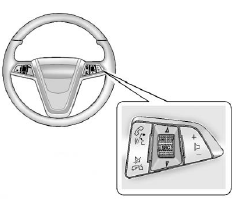 Steering Wheel Controls
For vehicles with audio steering wheel controls, some audio controls can be adjusted at the steering wheel.
 Press to interact with the available Bluetooth, OnStar, or navigation system.
 Press to silence the vehicle speakers only. Press again to turn the sound on. For vehicles with OnStar or Bluetooth systems, press to reject an incoming call, or to end a current call.
 to select a radio band or audio source.
Turn  to select the next or previous favorite radio station, CD, or MP3 track.
Press SRC to change between radio and CD or DVD.
 Press + to increase or − to decrease the volume.
For more information, see Steering Wheel Controls .
See also:
Disarming the System
To disarm the system, do one of the following:
Press on the RKE transmitter.
Approach the vehicle with the RKE transmitter (keyless access).
Start the engine.
The alarm automatically disar ...
Power Outlets
The accessory power outlets can be used to plug in electrical equipment, such
as a cell phone or MP3 player.
There is one accessory power outlet located on the instrument panel below the
climate ...
Tires
Your new vehicle comes with high-quality tires
made by a leading tire manufacturer. If you ever
have questions about your tire warranty and where
to obtain service, see your GM Warranty booklet
fo ...