


How the System Works
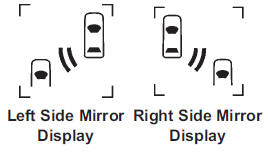
When the vehicle is started, both outside mirror displays will briefly come on to indicate that the system is operating. While driving forward, the left or right side mirror SBZA display will light up if a vehicle is detected in that blind zone. If you activate a turn signal and a vehicle has been detected on the same side, the SBZA display will flash to give you extra warning not to change lanes.
SBZA displays do not come on while the vehicle is approaching or passing other vehicles. At speeds greater than 32 km/h (20 mph), SBZA displays may come on when a vehicle you have passed remains in or drops back into the detection zone.
SBZA can be disabled through vehicle personalization. See Vehicle Personalization for more information. If the SBZA is disabled by the driver, the SBZA mirror displays will not light up during normal driving.
See also:
How to Check Automatic Transmission
Fluid (4.6L Engine)
For the 4.6L V8 engine, it is not necessary to check the
transmission fluid level. A transmission fluid leak is
the only reason for fluid loss. If a leak occurs, take the
vehicle to your dealer/ ...
Steering Wheel Adjustment
The lever is located on the
left side of the steering
column.
To adjust the lever:
1. Hold the wheel and pull the lever toward you.
2. Move the steering wheel up or down into a
comfortable ...
On the Road
The LaCrosse moves out when pushed, but its capabilities stop short of an
all-out sport sedan's — fine by me, seeing as no one ever wanted Buick to build
the next BMW. The LaCrosse CXS, which pa ...