


Headphones
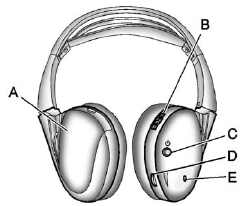
Headphones
A. Battery Cover
B. Channel 1 or 2 Switch
C. Power Button
D. Volume Control
E. Power Indicator Light
RSE includes two 2-channel wireless headphones. Channel 1 is dedicated to the DVD player, and Channel 2 is dedicated to any external auxiliary device connected to the A/V jacks. The headphones are used to listen to various multi-media. The wireless headphones have a power button, channel 1/2 switch, and a volume control.
Turn the headphones off when not in use.
Push  to turn on the headphones.
A light on the headphones comes on. If the light does not come on, check the batteries. Intermittent sound or static can also indicate weak batteries. See “Battery Replacement” later in this section for more information.
Infrared transmitters are on the top of the left seatback video screen.
The headphones shut off automatically to save the battery power if the RSE system is shut off or if the headphones are out of range of the transmitters for more than three minutes. Moving too far forward or stepping out of the vehicle can cause the headphones to lose the signal or have static.
To adjust the volume on the headphones, use the volume control.
For optimal audio performance, the headphones must be worn correctly.
Headphones should be worn with the headband over the top of the head for best audio reception. The symbol L (Left) appears on the outside bottom edge of the ear cup and should be positioned on the left ear. The symbol R (Right) appears on the outside bottom edge of the ear cup and should be positioned on the right ear.
Notice:
Do not store the
headphones in heat or direct
sunlight. This could damage the
headphones and repairs will not
be covered by the warranty.
Storage in extreme cold can
weaken the batteries. Keep the
headphones stored in a cool, dry
place.
If the foam ear pads attached to the headphones become worn or damaged, the pads can be replaced separately from the headphone set.
To purchase replacement ear pads, call 1-888-293-3332, then prompt zero (0), or contact your dealer.
Battery Replacement
To change the batteries:
1. Loosen the screw to the battery door located on the left side of the headphones.
2. Slide the battery door open.
3. Replace the two AAA batteries.
4. Replace the battery door and tighten the screw.
Remove the batteries if the headphones are not going to be used for a long period of time.
See also:
Wheel Alignment and Tire Balance
The tires and wheels on your vehicle were aligned
and balanced carefully at the factory to give you
the longest tire life and best overall performance.
Adjustments to wheel alignment and tire
ba ...
Safety
All-disc antilock brakes are standard on all Terrazas. Front-wheel-drive
models get standard traction control and General Motors' StabiliTrak electronic
stability system. Side-impact airbags for t ...
Used Replacement Wheels
WARNING
Replacing a wheel with a used one is dangerous. How it has been used or how far
it has been driven may be unknown. It could fail suddenly and cause a crash. When
replacing wheels, use a ...