


Seat Adjustment
Manual Seats
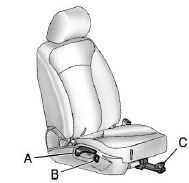
A. Seatback Recline Lever
B. Height Adjustment Switch
C. Seat Position Handle
To adjust the seat position:
1. Pull the handle (C) under the front of the seat cushion.
2. Slide the seat to the desired position and release the handle.
3. Try to move the seat back and forth to be sure it is locked in place.
Press and hold the top or bottom of the switch (B) to raise or lower the seat. Release the switch when the desired height is reached.
To raise or recline the seatback, use the lever (A) on the outboard side of the seat. See Reclining Seatbacks.
Power Seats
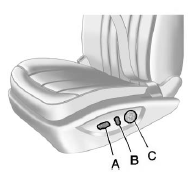
A. Power Seat Adjustment Control
B. Reclining Seatbacks
C. Lumbar Adjustment
To adjust a power seat, if equipped:
► Move the seat forward or rearward by sliding the control (A) forward or rearward.
► Raise or lower the front or rear part of the seat cushion by moving the front or rear of the control (A) up or down.
► Raise or lower the entire seat by moving the control (A) up or down.
See Power Seat Adjustment for more information.
To raise or recline the seatback, tilt the top of the control (B) forward or rearward. See Reclining Seatbacks.
Press the front or rear of the control (C) to increase or decrease lumbar support. See Lumbar Adjustment.
See also:
Security
OnStar provides services like Stolen
Vehicle Assistance, Remote Ignition
Block, and Roadside Assistance,
if the vehicle is equipped with these
services. OnStar can unlock the
vehicle doors r ...
Radio Frequency
Identification (RFID)
RFID technology is used in some vehicles for functions
such as tire pressure monitoring and ignition system
security, as well as in connection with conveniences
such as key fobs for remote door ...
OnStar®
If the vehicle is equipped with an active OnStar system, that system may also record data in crash or near crash-like situations. The OnStar Terms and Conditions provides information on data collectio ...