


Selecting a Menu Option
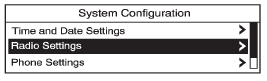
1. Turn the Menu knob to move the highlighted bar.
2. Press SELECT to select the highlighted option.
See also:
Passenger Safety Belt Reminder Light
When the vehicle is started, this light flashes and a chime may come on to remind
front passengers to fasten their safety belt. Then the light stays on solid until
the belt is buckled.
For more ...
Making a Call
To make a call:
1. Press .
2. Select Enter number.
3. Enter the character sequence.
See “Entering a Character
Sequence” in Operation for more information.
4. Select Call to start dialing th ...
Manual Operation
(Power): Press to turn the fan
on or off.
(Fan Control): Press to
increase or decrease the fan speed.
The fan speed setting appears on
the main display. Pressing either
button cancels auto ...