


Turn and Lane-Change Signals
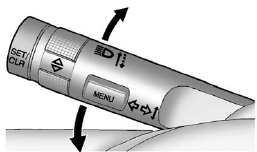
Turn and Lane-Change Signals
Move the lever all the way up or down to signal a turn.
An arrow on the instrument panel cluster flashes in the direction of the turn or lane change.
Raise or lower the lever until the arrow starts to flash to signal a lane change. Hold it there until the lane change is completed. If the lever is briefly pressed and released, the turn signal flashes three times.
The turn and lane-change signal can be turned off manually by moving the lever back to its original position.
If after signaling a turn or lane change the arrow flashes rapidly or does not come on, a signal bulb might be burned out.
Have the bulbs replaced. If the bulb is not burned out, check the fuse.
See Fuses and Circuit Breakers.
See also:
Erasing Universal Home RemoteButtons
You should erase the programmed buttons when
you sell the vehicle or terminate your lease.
To erase either rolling code or fixed code on the
Universal Home Remote device, do the following:
1. ...
If the Vehicle Is Stuck
Slowly and cautiously spin the wheels to free the vehicle when stuck in sand, mud, ice, or snow.
If stuck too severely for the traction system to free the vehicle, turn the traction system off and us ...
Six-Disc CD (MP3) Player
To set the time and date:
1. Turn the ignition key to ACC/ACCESSORY or
ON/RUN. Press to turn the radio
on.
2. Press MENU.
3. Press the softkey below the
tab. The HR, MIN,
MM, DD, YYYY dis ...