


Front Storage
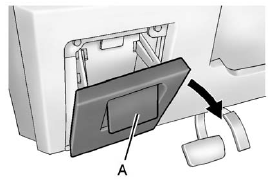
Front Storage
Pull up on the handle (A) and pull the cover down to open.
See also:
Cargo Cover
If your vehicle has a cargo cover, you can use it
to cover items in the cargo area of your vehicle.
To install the cargo cover, do the following:
1. Align the endcap with the pocket in the trim ...
Turning the Rear Vision Camera
System On or Off
To turn the RVC system on or off:
1. Shift into P (Park).
2. Press the CONFIG button to
enter the configure menu
options.
3. Select Display.
4. Select Rear Camera Options.
5. Select Camera. ...
Where Are the Airbags?
The driver frontal airbag is in the
center of the steering wheel.
The front outboard passenger
frontal airbag is in the passenger
side instrument panel.
Driver Side Shown, Passenger
Side ...