


Memory Features
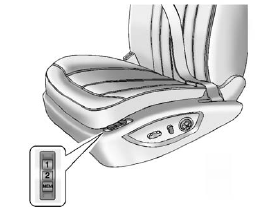
On vehicles with the memory feature, the “1” and “2” buttons on the outboard side of the driver seat are used to manually save and recall the driver seat and outside mirror positions. These manually stored positions are referred to as Button Memory positions.
The vehicle will also automatically save driver seat and outside mirror positions to the current driver Remote Keyless Entry (RKE) transmitter when the ignition is placed in OFF. These automatically stored positions are referred to as RKE Memory positions.
Storing Button Memory Positions
To save positions into Button Memory:
1. Adjust the driver seat, seatback recliner, and both outside mirrors to the desired driving positions.
2. Press and hold MEM (Memory) and “1” at the same time until a beep sounds.
3. Repeat Steps 1 and 2 for a second driver using “2.”.
To recall the manually saved Button Memory positions, press and hold “1” or “2.” The driver seat and outside mirrors move to the positions stored to those buttons when pressed. Releasing “1” or “2” before the stored positions are reached stops the recall.
To automatically recall RKE Memory
positions, unlock the driver door
with the RKE transmitter, and open
the driver door. On vehicles with
Keyless Access, opening the driver
door when an RKE transmitter is
present will activate the RKE
Memory recall. If the driver door is
already open, pressing the RKE
transmitter  button will also
activate the RKE Memory recall.
button will also
activate the RKE Memory recall.
The driver seat and outside mirrors will move to the previously saved RKE Memory positions.
See Memory Seats for more information.
Easy Exit Driver Seat
This feature moves the seat rearward allowing the driver more room to exit the vehicle.
To activate, place the ignition in OFF and open the driver door. If the driver door is already open, placing the ignition in OFF will activate the easy exit driver seat.
This feature is turned on or off using the vehicle personalization menu.
See Vehicle Personalization for more information.
See also:
Repair Facility
GM also recommends that you choose a collision repair facility that meets your
needs before you ever need collision repairs. Your dealer may have a collision repair
center with GM-trained technici ...
Power Door Locks
Select Power Door Locks and the following will be displayed:
Auto Door Unlock
Delay Door Lock
Open Door Anti Lock Out
Passive Door Unlock
Auto Door Unlock
This allows selection of which ...
Ride Control System Messages
SERVICE TRACTION CONTROL
This message displays when there is a problem with the Traction Control System (TCS). When this message is displayed, the system will not limit wheel spin. Adjust your drivin ...