


Manual Seats
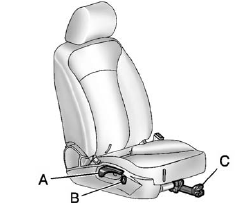
Manual Seats
A. Seatback Recline Lever
B. Height Adjustment Switch
C. Seat Position Handle
To adjust the seat position:
1. Pull the handle (C) under the front of the seat cushion.
2. Slide the seat to the desired position and release the handle (C).
3. Try to move the seat back and forth to be sure it is locked in place.
Press and hold the top or bottom of the switch (B) to raise or lower the seat. Release the switch (B) when the desired height is reached.
To raise or recline the seatback, use the lever (A) on the outboard side of the seat.
See Seat Adjustment and Reclining Seatbacks for more information.
See also:
Tilt Wheel
The tilt lever is located on
the left side of the steering
column.
To adjust the lever:
1. Hold the wheel and pull the lever toward you.
2. Move the steering wheel up or down into a
comfort ...
Sending a Stored Name Tag During a Call
1. Press . The system responds
with “Ready”
followed by a tone.
2. Say “Send name tag.” The system responds with
“Say a name tag to send tones” followed by a tone.
3. Say the name ...
Online Owner Center
Online Owner Center
(United States only)
The Owner Center is a resource for your GM
ownership needs. Specific vehicle information
can be found in one place.
The Online Owner Center allows you to: ...