


Tire and Loading Information Label
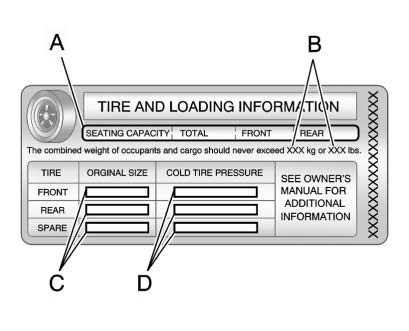
A vehicle-specific Tire and Loading Information label is attached to the vehicle's center pillar (B-pillar).
With the driver door open, you will find the label attached below the door lock post.
The Tire and Loading Information label shows the number of occupant seating positions (A), and the maximum vehicle capacity weight (B) in kilograms and pounds.
The Tire and Loading Information label also shows the tire size of the original equipment tires (C) and the recommended cold tire inflation pressures (D). For more information on tires and inflation see Tires and Tire Pressure .
There is also important loading information on the Certification label. It tells you the Gross Vehicle Weight Rating (GVWR) and the Gross Axle Weight Rating (GAWR) for the front and rear axle. See “Certification Label” later in this section.
See also:
Making a Call
To make a call:
1. Press once or twice, depending
on the radio.
2. Enter the character sequence. See “Entering a Character Sequence” in Operation
for more information.
3. Select Call ...
How OnStar Service Works
Automatic Crash Response,
Emergency Services, Crisis Assist,
Stolen Vehicle Assistance, Vehicle
Diagnostics, Remote Door Unlock,
Roadside Assistance, Turn-by-Turn
Navigation, and Hands-Free ...
If a Tire Goes Flat
It is unusual for a tire to blow out
while driving, especially if the tires
are maintained properly. See Tires. If air goes out of a
tire, it is much more likely to leak
out slowly. But if the ...