


Removal and Installation of the Sealant Canister
To remove the sealant canister:
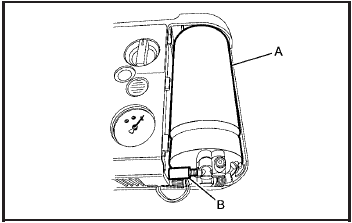
1. Remove the plastic cover.
2. Unscrew the connector (B) from the canister (A).
3. Pull up on the canister (A) to remove it.
4. Replace with a new canister which is available from your dealer/retailer.
5. Push the new canister into place.
6. Screw the connector (B) to the canister (A).
7. Slide the plastic cover back on.
See also:
Replacing Brake System Parts
The braking system on a vehicle is complex. Its many parts have to be of top
quality and work well together if the vehicle is to have really good braking. The
vehicle was designed and tested with ...
Reporting Safety Defects to theCanadian Government
If you live in Canada, and you believe that your
vehicle has a safety defect, you should
immediately notify Transport Canada, in addition
to notifying General Motors of Canada Limited.
You may c ...
GM Mobility Reimbursement Program (U.S. and Canada)
This program is available to
qualified applicants for cost
reimbursement of eligible
aftermarket adaptive equipment
required for the vehicle, such as
hand controls or a wheelchair/scooter ...