


Universal Home Remote System Operation (With Three Round LED)
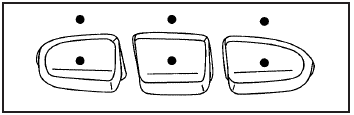
This vehicle may have the Universal Home Remote System. If there are three round Light Emitting Diode (LED) indicator lights above the Universal Home Remote buttons, follow the instructions below.
This system provides a way to replace up to three remote control transmitters used to activate devices such as garage door openers, security systems, and home automation devices.
Do not use this system with any garage door opener that does not have the stop and reverse feature.
This includes any garage door opener model manufactured before April 1, 1982.
Read the instructions completely before attempting to program the transmitter. Because of the steps involved, it may be helpful to have another person assist with programming the transmitter.
Be sure to keep the original remote control transmitter for use in other vehicles, as well as, for future programming.
Only the original remote control transmitter is needed for Fixed Code programming. The programmed buttons should be erased when the vehicle is sold or the lease ends. See “Erasing Universal Home Remote Buttons” later in this section.
Park the vehicle outside of the garage when programming a garage door. Be sure that people and objects are clear of the garage door or gate that is being programmed.
See also:
Setting the Clock (Radio with CD and Touchscreen)
The clock is in the center stack display.
To set the time:
1. Press the CONFIG button to enter the menu options or press
. Turn the TUNE/MENU knob to scroll
through the available setup features. ...
Using the Call Command
1. Press
.
► For vehicles without a navigation system, the system responds “Ready,” followed by a tone.
► For vehicles with a navigation system, the system responds with a tone. Aft ...
Checking Engine Oil
It is a good idea to check the engine oil every time
you get fuel. In order to get an accurate reading,
the oil must be warm and the vehicle must be
on level ground.
The engine oil dipstick hand ...