


Battery Replacement
Replace the battery if the REPLACE BATTERY IN REMOTE KEY message appears in the DIC. See “REPLACE BATTERY IN REMOTE KEY” under DIC Warnings and Messages for additional information.
Notice: When replacing the battery, do not touch any of the circuitry on the transmitter. Static from your body could damage the transmitter.
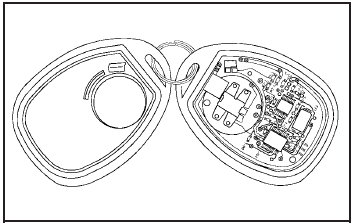
To replace the battery:
1. Separate the transmitter with a flat, thin object inserted into the notch on the side.
2. Remove the old battery. Do not use a metal object.
3. Insert the new battery, positive side facing down.
Replace with a CR2032 or equivalent battery.
4. Snap the transmitter back together.
See also:
Replacing Safety Belt System Parts after a Crash
WARNING
A crash can damage the safety belt system in the vehicle.
A damaged safety belt system may not properly protect the person using it, resulting in serious injury or even death in a crash. ...
Windshield Wiper Blade
Replacement
Windshield wiper blades should be inspected for wear
or cracking. See Scheduled Maintenance.
It is a good idea to clean or replace the wiper blade
assembly on a regular basis or when worn. For pr ...
Fabric/Carpet
Start by vacuuming the surface
using a soft brush attachment. If a
rotating brush attachment is being
used during vacuuming, only use it
on the floor carpet. Before cleaning,
gently remove a ...