


Heated and Ventilated Seats
On vehicles with heated and ventilated seats, the ignition must be on to use the feature.
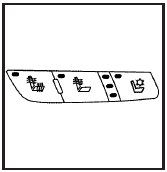
Driver’s Side Buttons shown
The buttons are located on the front doors.
 (Heated Seat Cushion and Seatback):
Press this
button to heat the seat cushion and seatback.
(Heated Seat Cushion and Seatback):
Press this
button to heat the seat cushion and seatback.
 (Heated Seatback): Press this button
to heat the
seatback.
(Heated Seatback): Press this button
to heat the
seatback.
 (Ventilated Seat Cushion and
Seatback): Press
this button to cool the seat cushion and seatback.
(Ventilated Seat Cushion and
Seatback): Press
this button to cool the seat cushion and seatback.
Press each button to turn on the desired feature. A light on that button will display indicating which feature is on.
There are three temperature settings for each feature.
A column of three lights next to the buttons will display which setting the feature is in: high, medium or low. Three lights indicate the highest setting, two lights indicate medium and one light indicates the lowest setting.
When you press a button, the feature will turn on at the highest setting. Each time you press the button, the feature will decrease one temperature setting.
To turn the feature off, keep pressing the button until the display lights turn off.
If your vehicle has remote vehicle start and is started using the remote keyless entry transmitter, the front heated seats will be turned on to the high setting if it is cold outside. See “Remote Vehicle Start” under Remote Keyless Entry (RKE) System Operation. When the key is inserted into the ignition and the ignition is turned on, the heated seat feature will turn off. To turn the heated seat feature back on, press the desired button.
See also:
Delayed Locking
When locking the doors with the
power lock switch and a door is
open, the doors will lock
five seconds after the last door is
closed. You will hear three chimes
to signal that the delayed lo ...
OnStar Steering Wheel Controls
This vehicle may have a Talk/Mute button that can be
used to interact with OnStar hands-free calling. See
Audio Steering Wheel Controls for more
information.
On some vehicles, the mute button c ...
Receiving a Call
When an incoming call is received, the audio system
mutes and a ring tone is heard in the vehicle.
• Press and begin speaking to
answer the call.
• Press to ignore a call. ...