


Power Lumbar
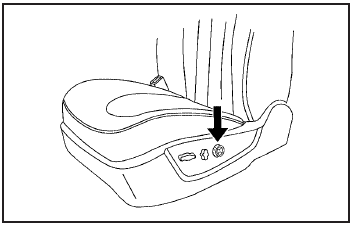
On vehicles with power lumbar, the control is located on the outboard side of the front seats.
For vehicles with a two-way lumbar control, press the control top or bottom to increase or decrease support in the lower seatback.
On vehicles with a four-way lumbar control, press the control forward or rearward to increase or decrease support in the lower seatback. Press the top or bottom of the control to raise or lower the support in the seatback.
The lumbar support may need to be re-adjusted when changing the seating position.
See also:
Playing the Radio
PWR (Power): Push this knob to turn the system
on and off.
VOLUME
: Turn this knob clockwise or
counterclockwise to increase or to decrease
the volume.
INFO (Information): When the ignition is ...
Available Services with Safe &Sound® Plan
• Automatic Notification of Airbag Deployment
• Advanced Automatic Crash
Notification (AACN) (If equipped)
• Link to Emergency Services
• Roadside Assistance
• Stolen Vehicle Location A ...
Wipe Parking
If the ignition is turned to LOCK/ OFF while the wipers are on 1, 2, or
, they will immediately stop.
If the windshield wiper lever is then moved to
before the driver door is opened, or
within 1 ...