


Trailer Wiring Harness
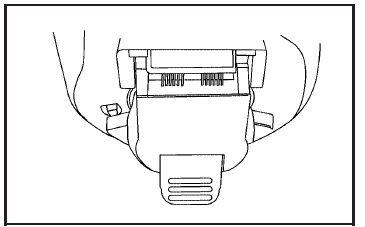
Your vehicle is equipped with a seven-wire trailer towing harness. This harness has a seven-pin universal heavy-duty trailer connector (if equipped with the trailering package) that is attached to a bracket on the hitch platform. If your vehicle is not equipped with the heavy-duty trailer connector, you may purchase one from your dealer.
The seven-wire harness contains the following trailer circuits:
• Yellow: Left Stop/Turn Signal
• Dark Green: Right Stop/Turn Signal
• Brown: Running Lamps
• White: Ground
• Light Green: Back-up Lamps
• Dark Blue: Electric Brakes
• Red: Battery Feed (The chassis wiring ring
terminal must be fastened to a stud on the
underhood electrical center before the
trailer feed will become active.)
If you need to tow a light-duty trailer with a standard four-way round pin connector, an adapter connector is available from your dealer.
If you are charging a remote (non-vehicle) battery, turn on the headlamps to boost the vehicle system voltage and properly charge the battery.
Your vehicle is also equipped with wiring for an electric trailer brake controller. These wires are located inside the vehicle on the driver’s side under the instrument panel. These wires should be connected to an electric trailer brake controller by your dealer or a qualified service center.
See also:
Navigation System
If the vehicle has a navigation
system, there is a separate
navigation system manual that
includes information on the radio,
audio players, and navigation
system.
The navigation system prov ...
Low Fuel Warning Light
The light next to the fuel gage will come on briefly
when you are starting the engine.
This light comes on when the fuel tank is low on
fuel. To turn it off, add fuel to the fuel tank. ...
Recreational Vehicle Towing
Recreational vehicle towing means towing your
vehicle behind another vehicle — such as behind
a motorhome. The two most common types of
recreational vehicle towing are known as “dinghy
towingâ ...