


Tire and Loading Information Label
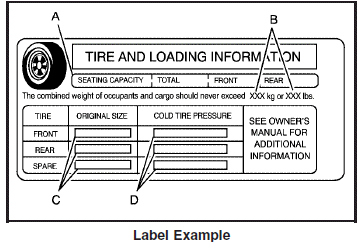
A vehicle specific Tire and Loading Information label is attached to the center pillar (B-pillar).
With the driver’s door open, you will find the label attached below the door lock post (striker).
The tire and loading information label shows the number of occupant seating positions (A), and the maximum vehicle capacity weight (B) in kilograms and pounds.
The Tire and Loading Information label also shows the size of the original equipment tires (C) and the recommended cold tire inflation pressures (D).
There is also important loading information on the vehicle Certification/Tire label. It tells you the Gross Vehicle Weight Rating (GVWR) and the Gross Axle Weight Rating (GAWR) for the front and rear axle. See “Certification/Tire Label” later in this section.
See also:
Single CD (MP3) Player
To set the time and date:
1. Turn the ignition key to ACC/ACCESSORY or
ON/RUN. Press to turn the radio
on.
2. Press and the HR, MIN, MM, DD,
YYYY (hour,
minute, month, day, and year) displ ...
Cleaning Exterior Lamps/Lenses
Use only lukewarm or cold water, a soft cloth and a car
washing soap to clean exterior lamps and lenses. Follow
instructions under Washing Your Vehicle. ...
Playing an MP3
Insert a CD partway into the slot (Single CD Player), or
press the load button and wait for the message to
insert disc (Six-Disc CD Player), label side up. The
player pulls it in, and the CD sho ...