


DVD Player Buttons (With Sunroof)
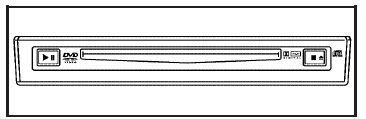
 (Play/Pause): Press this
button to start play
of a DVD or CD. Press this button while a
DVD or CD is playing to pause it. Press this button
again to continue the play of the DVD or CD.
(Play/Pause): Press this
button to start play
of a DVD or CD. Press this button while a
DVD or CD is playing to pause it. Press this button
again to continue the play of the DVD or CD.
 (Stop/Eject): Press this
button to
stop playing, rewinding, or fast forwarding a DVD
or CD. Press this button twice to return to the
beginning of the DVD.
(Stop/Eject): Press this
button to
stop playing, rewinding, or fast forwarding a DVD
or CD. Press this button twice to return to the
beginning of the DVD.
Press and hold this button for more than three seconds to eject a DVD or CD.
See also:
Exit Lighting
With exit lighting, the interior lamps come on when
you remove the key from the ignition. If the
dome override is off, these lamps stay on for a
short period of time and then go out. ...
First Engine Oil Change After Every
40 000 km/25,000 Miles
• Fuel system inspection for damage or leaks. ...
Audio Output
Audio from the DVD player or auxiliary inputs may
be heard through the following possible sources:
• Wireless Headphones
• Vehicle Speakers
• Vehicle wired headphone jacks on the Rear
Sea ...