


Cruise Control
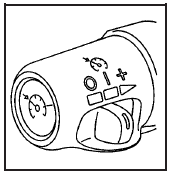
Your vehicle has cruise control. The controls are located on the end of the turn signal/ multifunction lever.
 (On): Move the switch to
this position to turn
the cruise control system on.
(On): Move the switch to
this position to turn
the cruise control system on.
 (Resume/Accelerate): Move
the switch to this
position to resume a set speed or to accelerate.
(Resume/Accelerate): Move
the switch to this
position to resume a set speed or to accelerate.
 (Set): Press this button,
located at the end of
the lever, to set a speed.
(Set): Press this button,
located at the end of
the lever, to set a speed.
 (Off): Move the switch to
this position to turn
the cruise control system off and cancel memory
of a set speed.
(Off): Move the switch to
this position to turn
the cruise control system off and cancel memory
of a set speed.
With cruise control, you can maintain a speed of about 25 mph (40 km/h) or more without keeping your foot on the accelerator. This can really help on long trips. Cruise control does not work at speeds below about 25 mph (40 km/h).
If you apply the brakes, the cruise control shuts off.
CAUTION:
Cruise control can be dangerous where
you cannot drive safely at a steady speed.
So, do not use your cruise control on
winding roads or in heavy traffic.
Cruise control can be dangerous on
slippery roads. On such roads, fast
changes in tire traction can cause
excessive wheel slip, and you could lose
control. Do not use cruise control on
slippery roads.
CAUTION:
If you leave your cruise control on when
you are not using cruise, you might hit a
button and go into cruise when you do
not want to. You could be startled and
even lose control. Keep the cruise control
switch off until you want to use
cruise control.
See also:
Jump Starting
If your vehicle’s battery has run down, you may
want to use another vehicle and some jumper
cables to start your vehicle. Be sure to use
the following steps to do it safely.
CAUTION:
Batterie ...
Programming with a Recognized Transmitter (Keyless Access Vehicles Only)
A new transmitter can be programmed to the vehicle when there is one recognized
transmitter. To program, the vehicle must be off and all of the transmitters, both
currently recognized and new, mus ...
Uniform Tire Quality Grading
Quality grades can be found where applicable on
the tire sidewall between tread shoulder and
maximum section width. For example:
Treadwear 200 Traction AA
Temperature A
The following informati ...