


Where Are the Airbags?
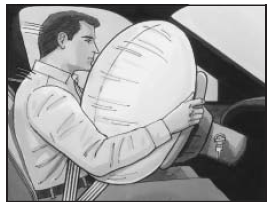
The driver’s frontal airbag is in the middle of the steering wheel.

The right front passenger’s frontal airbag is in the instrument panel on the passenger’s side.
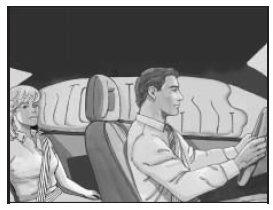
If your vehicle has a roof-mounted airbag for the driver and the person seated directly behind the driver, it is located in the ceiling above the side windows.
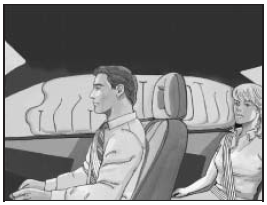
If your vehicle has a roof-mounted airbag for the right front passenger and the person directly behind that passenger, it is located in the ceiling above the side windows.
CAUTION:
If something is between an occupant
and an airbag, the bag might not inflate
properly or it might force the object into
that person causing severe injury or even
death. The path of an inflating airbag
must be kept clear. Do not put anything
between an occupant and an airbag, and
do not attach or put anything on the
steering wheel hub or on or near any
other airbag covering. And, if your vehicle
has roof-mounted side impact airbags,
never secure anything to the roof of your
vehicle by routing the rope or tie down
through any door or window opening.
If you do, the path of an inflating side
impact airbag will be blocked. The path
of an inflating airbag must be kept clear.
See also:
Dinghy Towing
Dinghy Towing
Notice:
If the vehicle is towed
with all four wheels on the
ground, the drivetrain
components could be damaged.
The repairs would not be covered
by the vehicle warranty. Do ...
Checking Coolant
The vehicle must be on a level surface when checking the coolant level.
Check to see if coolant is visible in the coolant surge tank. If the coolant inside the coolant surge tank is boiling, do not d ...
Buying New Tires
GM has developed and matched specific tires for the vehicle.
The original equipment tires installed were designed to meet General Motors Tire Performance Criteria Specification (TPC Spec) system rati ...