


Tire and Loading Information Label
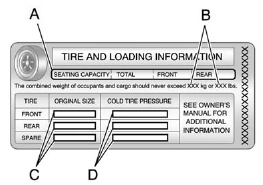
Label Example
A vehicle-specific Tire and Loading Information label is attached to the vehicle center pillar (B-pillar). With the driver door open, you will find the label attached below the door lock post. The Tire and Loading Information label shows the number of occupant seating positions (A), and the maximum vehicle capacity weight (B) in kilograms and pounds.
The Tire and Loading Information label also shows the tire size of the original equipment tires (C) and the recommended cold tire inflation pressures (D). For more information on tires and inflation see Tires and Tire Pressure .
There is also important loading information on the Certification label. It tells you the Gross Vehicle Weight Rating (GVWR) and the Gross Axle Weight Rating (GAWR) for the front and rear axle; see “Certification Label” later in this section.
Steps for Determining Correct Load Limit
1. Locate the statement “The combined weight of occupants and cargo should never exceed XXX kg or XXX lbs” on your vehicle's placard.
2. Determine the combined weight of the driver and passengers that will be riding in your vehicle.
3. Subtract the combined weight of the driver and passengers from XXX kg or XXX lbs.
4. The resulting figure equals the available amount of cargo and luggage load capacity. For example, if the “XXX” amount equals 1400 lbs and there will be five 150 lb passengers in your vehicle, the amount of available cargo and luggage load capacity is 650 lbs (1400 − 750 (5 x 150) = 650 lbs).
5. Determine the combined weight of luggage and cargo being loaded on the vehicle. That weight may not safely exceed the available cargo and luggage load capacity calculated in Step 4.
6. If your vehicle will be towing a trailer, the load from your trailer will be transferred to your vehicle. Consult this manual to determine how this reduces the available cargo and luggage load capacity of your vehicle.
See Trailer Towing for important information on towing a trailer, towing safety rules, and trailering tips.
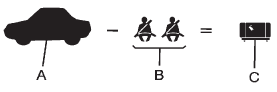
Example 1
A. Vehicle Capacity Weight for Example 1 = 453 kg (1,000 lbs).
B. Subtract Occupant Weight @ 68 kg (150 lbs) × 2 = 136 kg (300 lbs).
C. Available Occupant and Cargo Weight = 317 kg (700 lbs).
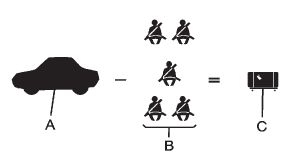
Example 2
A. Vehicle Capacity Weight for Example 2 = 453 kg (1,000 lbs).
B. Subtract Occupant Weight @ 68 kg (150 lbs) × 5 = 340 kg (750 lbs).
C. Available Cargo Weight = 113 kg (250 lbs).
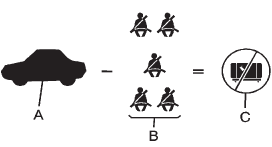
Example 3
A. Vehicle Capacity Weight for Example 3 = 453 kg (1,000 lbs).
B. Subtract Occupant Weight @ 91 kg (200 lbs) × 5 = 453 kg (1,000 lbs).
C. Available Cargo Weight = 0 kg (0 lbs).
Refer to the vehicle's Tire and Loading Information label for specific information about the vehicle's capacity weight and seating positions. The combined weight of the driver, passengers, and cargo should never exceed the vehicle's capacity weight.
See also:
Glove Box
Lift the glove box handle up to open it. Use the key to
lock and unlock the glove box. ...
Public Transportation or Fuel
Reimbursement
If the vehicle requires overnight
warranty repairs, and public
transportation is used instead of
your dealer's shuttle service, the
expense must be supported by
original receipts and can onl ...
Tires
Use a stiff brush with tire cleaner to clean the tires.
Notice: Using petroleum-based tire dressing products on the vehicle may damage
the paint finish and/or tires. When applying a tire dressing, ...