


Climate Control Systems
The heating, cooling, defrosting, and ventilation for the vehicle can be controlled with this system.
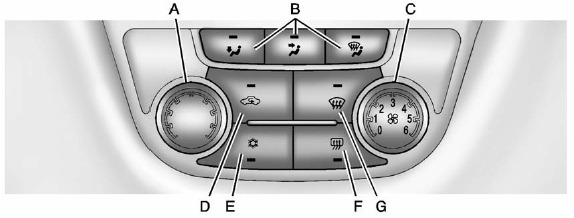
A. Temperature Control
B. Air Delivery Modes
C. Fan Control
D. Recirculation
E. Air Conditioning
F. Rear Window Defogger
G. Defrost
 (Fan Control): Turn the knob clockwise
or counterclockwise to increase or decrease the fan speed. Turn the knob completely
to 0 to turn off the fan.
(Fan Control): Turn the knob clockwise
or counterclockwise to increase or decrease the fan speed. Turn the knob completely
to 0 to turn off the fan.
Temperature Control: Turn the knob clockwise or counterclockwise to increase or decrease the temperature setting.
Air Delivery Mode Control: Press  ,
or
,
or  to change the direction of the
airflow. An indicator light comes on in the selected mode button.
to change the direction of the
airflow. An indicator light comes on in the selected mode button.
 (Floor): Air is directed to the
floor outlets.
(Floor): Air is directed to the
floor outlets.
 (Vent): Air is directed to the
instrument panel outlets.
(Vent): Air is directed to the
instrument panel outlets.
 (Defog): Air is directed to the
windshield, floor outlets, and side window vents.
(Defog): Air is directed to the
windshield, floor outlets, and side window vents.
 (Defrost): Press to clear the windshield
of fog or frost more quickly. Air is directed to the windshield.
(Defrost): Press to clear the windshield
of fog or frost more quickly. Air is directed to the windshield.
For best results, clear all snow and ice from the windshield before defrosting.
Do not drive the vehicle until all the windows are clear.
See also:
Empty Directory or Folder
If a root directory or folder is empty
or contains only folders, the player
advances to the next folder in the
file structure that contains a
compressed audio file. The empty
folder(s) are n ...
Fuses and Circuit Breakers
The wiring circuits in your vehicle are protected
from short circuits by a combination of fuses
and circuit breakers. This greatly reduces
the chance of fires caused by electrical problems.
Look ...
Setting the Time and Date
(Radio with CD and
Touchscreen)
To set the time:
1. Press the CONFIG button to
enter the menu options. Turn the
Menuknob to scroll through the
available setup features. Press
the SELECT knob or press the
Time screen butto ...