


Menu System (Radio with CD)
The Menu system for the uplevel infotainment system appears on the display screen.
Controls
The TUNE/MENU knob and  BACK are
used to navigate the menu system.
BACK are
used to navigate the menu system.
TUNE/MENU:
Press to:
- Enter the menu system.
- Select or activate the highlighted menu option.
- Confirm a set value.
- Turn a system setting on or off.
Turn to:
- Highlight a menu option.
- Select a value.
BACK:
Press to:
- Exit a menu.
- Return from a submenu screen to the previous menu screen.
- Delete the last character in a sequence.
Selecting a Menu Option
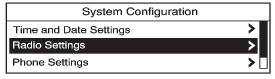
1. Turn the TUNE/MENU knob to move the highlighted bar.
2. Press the TUNE/MENU knob to select the highlighted option.
Submenus
An arrow on the right-hand edge of the menu indicates that it has a submenu with other options.
Activating a Setting
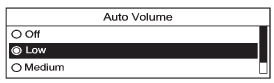
1. Turn the TUNE/MENU knob to highlight the setting.
2. Press the TUNE/MENU knob to activate the setting.
Setting a Value

1. Turn the TUNE/MENU knob to change the current value of the setting.
2. Press the TUNE/MENU knob to confirm the setting.
Turning a Function On or Off
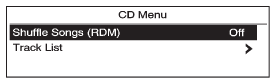
1. Turn the TUNE/MENU knob to highlight the function.
2. Press the TUNE/MENU knob to turn the function on or off.
Entering a Character Sequence
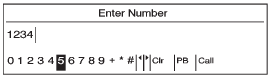
1. Turn the TUNE/MENU knob to highlight the character.
2. Press the TUNE/MENU knob to select the character.
Press BACK to delete the last character
in the sequence or press and hold to delete the entire character sequence.
See also:
How the System Works
When the vehicle is started, both
outside mirror displays will briefly
come on to indicate that the system
is operating. While driving forward,
the left or right side mirror SBZA
display w ...
Theft-Deterrent Feature
The theft-deterrent feature works by
learning a portion of the Vehicle
Identification Number (VIN) to the
infotainment system. The
infotainment system does not
operate if it is stolen or mov ...
All Vehicles
WARNING!
You can be injured and the
vehicle could be damaged if you
try to do service work on a vehicle
without knowing enough about it.
• Be sure you have sufficient
knowledge, experience ...