


Emissions Inspection and Maintenance Programs
Some local governments may have programs to inspect the on-vehicle emission control equipment. For the inspection, the emission system test equipment is connected to the vehicle’s Data Link Connector (DLC).
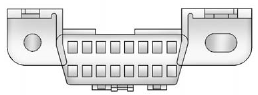
The DLC is under the instrument panel next to the steering wheel. See your dealer if assistance is needed.
The vehicle may not pass inspection if:
- The malfunction indicator lamp is on while the vehicle is running. The vehicle is in ON/RUN for keyed access, or service only mode for keyless access and the malfunction indicator lamp does not come on. See your dealer for assistance in verifying proper operation of the malfunction indicator lamp.
- The OBD II (On-Board Diagnostics) system determines that critical emission control systems have not been completely diagnosed. The vehicle would be considered not ready for inspection. This can happen if the 12-volt battery has recently been replaced or run down. The diagnostic system is designed to evaluate critical emission control systems during normal driving. This can take several days of routine driving. If this has been done and the vehicle still does not pass the inspection for lack of OBD II system readiness, your dealer can prepare the vehicle for inspection.
See also:
File System and Naming
The song name that displays is the song name that is
contained in the ID3 tag. If the song name is not present
in the ID3 tag, then the radio displays the file name
without the extension (such a ...
Care of CDs and DVDs
Sound quality can be reduced due
to disc quality, recording method,
quality of the music recorded, and
how the disc has been handled.
Handle discs carefully and store
them in their original c ...
Power Windows
The power window switches located on the driver door control all four windows.
Each passenger door has a switch that controls only that window.
Press the switch to lower the window. Pull the fron ...