


Glove Box
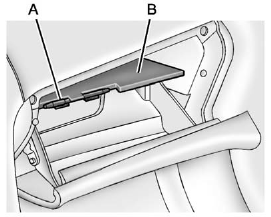
Lift up on the lever to open it.
The glovebox features a pen holder (A).
The intermediate shelf (B) can be removed by pulling on the front edge.
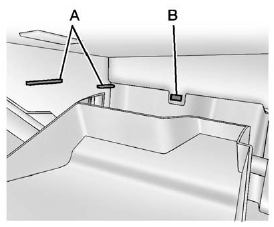
To reinstall the shelf, slide it into the side guides (A) and push back until it engages into the rear panel (B).
See also:
Cruising, Turning & Stopping
Ride comfort is still king at Buick, and it's a formula GM shouldn't change.
The LaCrosse leaves manhole covers and steel plates behind with the sort of
measured wump that you'll notice but won't ...
When to Check
Check the tires once a month or more. Do not forget the compact spare tire, if
the vehicle has one. The cold compact spare should be at 420 kPa (60 psi). For additional
information regarding the c ...
Sun Visors
Pull the visor toward you, or move to the side to help
reduce glare.
On vehicles with a lighted vanity mirror, lift the attached
cover to use. ...