


Instrument Panel Illumination Control
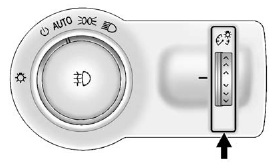
This feature controls the brightness of the instrument panel controls and infotainment display screen. The thumbwheel is located to the left of the steering column on the instrument panel.
 : Move the thumbwheel up or down
and hold, to brighten or dim the instrument panel controls and infotainment display
screen.
: Move the thumbwheel up or down
and hold, to brighten or dim the instrument panel controls and infotainment display
screen.
See also:
Heated and Ventilated Seats
On vehicles with heated and ventilated seats, the
controls are located on the front doors and the ignition
must be on to use the feature.
: Press to heat the seat and
seatback.
: Press to he ...
Exit Lighting
This allows selection of how long
the exterior lamps stay on when
leaving the vehicle and it is dark
outside.
Press SELECT when Exit Lighting is
highlighted. Turn the Menu knob to
select Of ...
When to Add Engine Oil
When to Add Engine Oil
If the oil is below the cross-hatched
area at the tip of the dipstick, add
1 L (1 qt) of the recommended oil
and then recheck the level. See
“Selecting the Right En ...