


Trunk Release
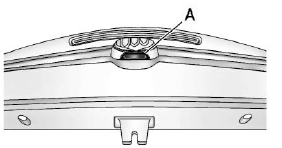
To open the trunk, press the touchpad (A) under the vehicle emblem.
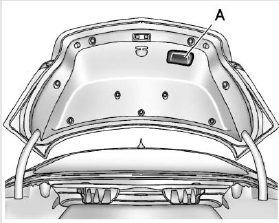
To close the trunk, use the pull cup (A) as an aid.
See also:
XM Categories (Radio with CD
and Touchscreen)
Adding or Removing Categories
1. From the Home Page press the
Config screen button or the
CONFIG button on the
infotainment system.
2. Select Radio Settings from the
Config Menu list.
3. Se ...
Adaptive Forward Lighting (AFL)
The Adaptive Forward Lighting
System (AFL) pivots the headlamps
horizontally to provide greater road
illumination while turning. To enable
AFL, set the exterior lamp switch to
the AUTO posit ...
Setting the Time and Date
(With Date Display)
1. Press the CONFIG button and
select Time and Date Settings,
or press .
2. Select Set Time or Set Date.
3. Turn the Menu knob to adjust
the highlighted value.
4. Press SELECT to select the n ...