


Instrument Panel Illumination Control
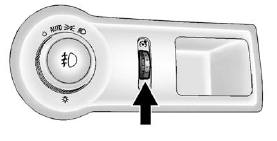
Instrument Panel Illumination Control
The brightness of the instrument panel lighting and steering wheel controls can be adjusted.
 (Instrument Panel
Illumination): Move and hold the
thumbwheel up or down to brighten
or dim the lights.
(Instrument Panel
Illumination): Move and hold the
thumbwheel up or down to brighten
or dim the lights.
See also:
Transferring a Call
Audio can be transferred between the in-vehicle Bluetooth system and the cell phone.
To Transfer Audio to the Cell Phone
During a call with the audio in the vehicle:
1. Press
.
The system respon ...
Wheel Alignment and Tire Balance
The tires and wheels were aligned and balanced at the factory to provide the
longest tire life and best overall performance. Adjustments to wheel alignment and
tire balancing will not be necessary ...
How to Add Automatic TransmissionFluid
Refer to the Maintenance Schedule to determine
what kind of transmission fluid to use.
Add fluid only after checking the transmission fluid
while it is hot. A cold check is used only as a
referenc ...