


Universal Remote System Programming
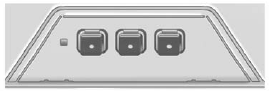
If the vehicle has this feature, you will see these buttons with one LED indicator next to them in the overhead console.
This system provides a way to replace up to three remote control transmitters used to activate devices such as garage door openers, security systems, and home automation devices.
Do not use the Universal Remote system with any garage door opener that does not have the stop and reverse feature. This includes any garage door opener model manufactured before April 1,1982.
Read the instructions completely before attempting to program the Universal Remote system. Because of the steps involved, it may be helpful to have another person available to assist with programming the Universal Remote system.
Keep the original hand-held transmitter for use in other vehicles as well as for future Universal Remote system programming. It is also recommended that upon the sale of the vehicle, the programmed Universal Remote system buttons be erased for security purposes.
See “Erasing Universal Remote System Buttons” later in this section.
When programming a garage door, park outside of the garage. Park directly in line with and facing the garage door opener motor-head or gate motor-head. Be sure that people and objects are clear of the garage door or gate being programmed.
It is recommended that a new battery be installed in the hand-held transmitter for quicker and more accurate transmission of the radio-frequency signal.
See also:
PhatNoise a segment first
Also available is the first-in-segment Mobile Digital Media Powered by
PhatNoise system. PhatNoise is a wallet-sized, 40-gigabyte hard drive that
installs in the Terraza's overhead rail system. Th ...
Fabric/Carpet
Start by vacuuming the surface
using a soft brush attachment. If a
rotating brush attachment is being
used during vacuuming, only use it
on the floor carpet. Before cleaning,
gently remove a ...
Courtesy Rental Vehicle
Your dealer may arrange to provide
you with a courtesy rental vehicle or
reimburse you for a rental vehicle
that you obtain if the vehicle is kept
for an overnight warranty repair.
Rental rei ...