


Center Console Storage
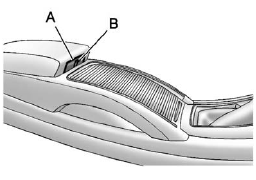
Center Console Storage
The armrest can be adjusted by sliding it to the desired position.
The center console has an upper tray and a lower main storage area.
To access the main storage area, adjust the armrest to the rear position and push button (A) to open. Push button (B) to access the upper tray.
An accessory power outlet is in the lower area. See Power Outlets.
Some vehicles might also have input jacks for auxiliary audio devices. See Auxiliary Devices (Radio with CD and Touchscreen).
See also:
XM Messages
XL (Explicit Language
Channels): These channels, or any
others, can be blocked by request,
by calling 1-800-929-2100 in the
U.S., and 1-877-438-9677 in
Canada.
XM Updating: The encryption c ...
Driving for Better Fuel Economy
Driving habits can affect fuel mileage. Here are some
driving tips to get the best fuel economy possible.
• Avoid fast starts and accelerate smoothly.
• Brake gradually and avoid abrupt stops. ...
Sensor
The solar sensor, located on top of
the instrument panel near the
windshield, monitors the solar heat.
The climate control system uses the
sensor information to adjust the
temperature, fan sp ...