


Turn and Lane-Change Signals
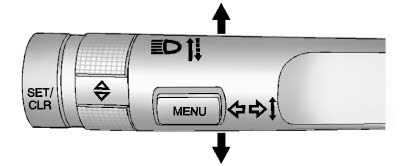
Move the lever all the way up or down to signal a turn.
An arrow on the instrument panel cluster flashes in the direction of the turn or lane change.
Raise or lower the lever until the arrow starts to flash to signal a lane change. Hold it there until the lane change is completed. If the lever is briefly pressed and released, the turn signal flashes three times.
The turn and lane-change signal can be turned off manually by moving the lever back to its original position.
If after signaling a turn or lane change, the arrow flashes rapidly or does not come on, a signal bulb might be burned out.
Have the bulbs replaced. If the bulb is not burned out, check the fuse.
See Fuses and Circuit Breakers .
See also:
Cruise Control
Your vehicle has cruise
control. The controls are
located on the end of
the turn signal/
multifunction lever.
(On): Move the switch to
this position to turn
the cruise control system on.
...
Where Are the Airbags?
The driver frontal airbag is in the center of the steering wheel.
The front outboard passenger frontal airbag is in the passenger side instrument
panel.
The driver knee airbag is below the ste ...
Vehicle Data Recording and Privacy
This GM vehicle has a number of sophisticated computers that record information about the vehicle’s performance and how it is driven.
For example, the vehicle uses computer modules to monitor and c ...