


Tire and Loading Information Label
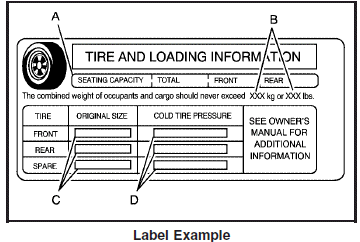
A vehicle specific Tire and Loading Information label is attached to the center pillar (B-pillar).
With the driver’s door open, you will find the label attached below the door lock post (striker).
The tire and loading information label shows the number of occupant seating positions (A), and the maximum vehicle capacity weight (B) in kilograms and pounds.
The Tire and Loading Information label also shows the size of the original equipment tires (C) and the recommended cold tire inflation pressures (D).
There is also important loading information on the vehicle Certification/Tire label. It tells you the Gross Vehicle Weight Rating (GVWR) and the Gross Axle Weight Rating (GAWR) for the front and rear axle. See “Certification/Tire Label” later in this section.
See also:
OnStar®
If the vehicle is equipped with an active OnStar system, that system may also record data in crash or near crash-like situations. The OnStar Terms and Conditions provides information on data collectio ...
Securing a Child Restraint Designed for
the LATCH System
WARNING:
If a LATCH-type child restraint is not attached to
anchors, the child restraint will not be able to
protect the child correctly. In a crash, the child
could be seriously injured or kil ...
Tire Pressure Monitor
This vehicle may have a Tire Pressure Monitor
System (TPMS).
The Tire Pressure Monitor
alerts you when a
significant reduction in
pressure occurs in one or
more of the vehicle’s tires
...