


Heated Seats
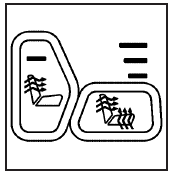
Your vehicle may have heated front seats.
The buttons used to control this feature are located on the front door armrests.
The engine must be running for the heated seat feature to work.
To heat the entire seat, press the horizontal button with the heated seat and seatback symbol.
Press the button to cycle through the temperature settings of high, medium, and low and to turn the heated seat off. The indicator lights above the button will come on to designate the level of heat selected: three for high, two for medium, and one for low. The low setting warms the seatback and seat cushion until the seat temperature is near body temperature. The medium and high settings heat the seatback and seat cushion to a slightly higher temperature. You will be able to feel heat in about two minutes.
To heat only the seatback, press the vertical button with the heated seatback symbol. An indicator light on the button will come on to designate that only the seatback is being heated.
Additional presses will cycle through the heat levels for the seatback only.
The feature will shut off automatically when the ignition is turned off.
See also:
Weatherstrips
Silicone grease on weatherstrips will make them last longer, seal better, and not stick or squeak. Apply silicone grease with a clean cloth.
During very cold, damp weather frequent application may be ...
Special Application Services
• Severe Commercial Use
Vehicles Only: Lubricate chassis
components every 5 000 km/3,000 mi.
• Have underbody flushing service
performed once a year. ...
Leather
A soft cloth dampened with water may be used to
remove dust. If a more thorough cleaning is
necessary, a soft cloth dampened with a mild soap
solution can be used. Allow the leather to dry
natural ...