


Exterior Lamp Controls
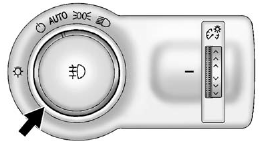
The exterior lamp control is located to the left of the steering column on the instrument panel.
It controls the following systems:
- Headlamps
- Taillamps
- Parking Lamps
- License Plate Lamps
- Instrument Panel Lights
- Fog Lamps
The exterior lamp control has four positions:
 (Off): Briefly turn to this position
to turn the automatic lamp control off or on again.
(Off): Briefly turn to this position
to turn the automatic lamp control off or on again.
AUTO (Automatic): Turns the headlamps on automatically at normal brightness, together with the following:
- Parking Lamps
- Taillamps
- License Plate Lamps
- Instrument Panel Lights
- Sidemarker Lamps
 (Parking Lamps): Turns the parking
lamps on together with the following:
(Parking Lamps): Turns the parking
lamps on together with the following:
- Taillamps
- License Plate Lamps
- Instrument Panel Lights
- Sidemarker Lamps
 (Headlamps): Turns the headlamps
on together with the lamps listed below. A warning chime sounds if the driver door
is opened when the ignition switch is off and the headlamps are on.
(Headlamps): Turns the headlamps
on together with the lamps listed below. A warning chime sounds if the driver door
is opened when the ignition switch is off and the headlamps are on.
- Parking Lamps
- Taillamps
- License Plate Lamps
- Instrument Panel Lights
- Sidemarker Lamps
 (Front Fog Lamps): For vehicles
with fog lamps, press to turn the lamps on or off.
(Front Fog Lamps): For vehicles
with fog lamps, press to turn the lamps on or off.
See Front Fog Lamps .
When the lights are on, will be lit.
See Lamps On Reminder .
will be lit.
See Lamps On Reminder .
See also:
Doing Your Own Service Work
WARNING:
You can be injured and the vehicle could be
damaged if you try to do service work on a vehicle
without knowing enough about it.
• Be sure you have sufficient knowledge,
experience, ...
Repair Facility
GM also recommends that you
choose a collision repair facility that
meets your needs before you ever
need collision repairs. Your dealer
may have a collision repair center
with GM-trained te ...
How to Reset the Engine Oil LifeSystem
The Engine Oil Life System calculates when to
change your engine oil and filter based on vehicle
use. Anytime your oil is changed, reset the
system so it can calculate when the next oil
change is ...