


Exterior Lighting
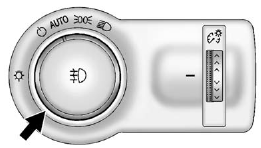
The exterior lamp control is located to the left of the steering column on the instrument panel.
 : Briefly turn to this position
to turn the automatic lamp control off or on again.
: Briefly turn to this position
to turn the automatic lamp control off or on again.
AUTO: Turns the headlamps on automatically at normal brightness, together with the parking lamps, taillamps, license plate lamps, sidemarker lamps, and instrument panel lights.
 : Turns on the parking lamps, taillamps,
license plate lamps, sidemarker lamps, and instrument panel lights.
: Turns on the parking lamps, taillamps,
license plate lamps, sidemarker lamps, and instrument panel lights.
 : Turns on the headlamps, parking
lamps, taillamps, license plate lamps, sidemarker lamps, and instrument panel lights.
A warning chime sounds if the driver door is opened when the ignition switch is
off and the headlamps are on.
: Turns on the headlamps, parking
lamps, taillamps, license plate lamps, sidemarker lamps, and instrument panel lights.
A warning chime sounds if the driver door is opened when the ignition switch is
off and the headlamps are on.
 : For vehicles with fog lamps, press
to turn the lamps on or off.
: For vehicles with fog lamps, press
to turn the lamps on or off.
For more information, see:
- Exterior Lamp Controls .
- Daytime Running Lamps (DRL) .
- Front Fog Lamps .
See also:
Playing a CD or MP3 CD (Radio with CD and Touchscreen)
Press the TUNE/MENU knob to display the CD Menu.
Shuffle: Select to play the tracks randomly rather than in sequence. Select again
to stop shuffle.
A checkmark indicates shuffle is on. Track List: ...
Navigation
OnStar navigation requires the Directions and Connections service plan.
Push to receive directions or have
them sent to the vehicle navigation screen. Destinations can also be forwarded to
the v ...
Linking to a Different Phone
1. Press
.
► For vehicles without a navigation system, the system responds “Ready,” followed by a tone.
► For vehicles with a navigation system, the system responds with a tone. Aft ...