


Head Restraints
The vehicle's front seats have adjustable head restraints in the outboard seating positions.
The vehicle's rear seats have adjustable head restraints in the outboard seating positions.
 WARNING
With head restraints that are not installed and adjusted properly, there is a greater chance that occupants will suffer a neck/ spinal injury in a crash. Do not drive until the head restraints for all occupants are installed and adjusted properly.
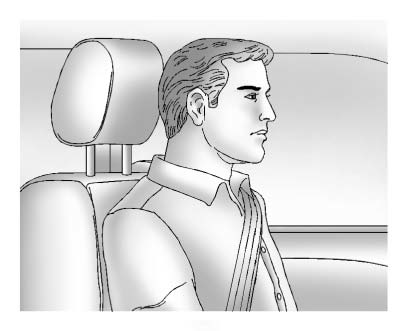
Adjust the head restraint so that the top of the restraint is at the same height as the top of the occupant's head. This position reduces the chance of a neck injury in a crash.
Front Seat
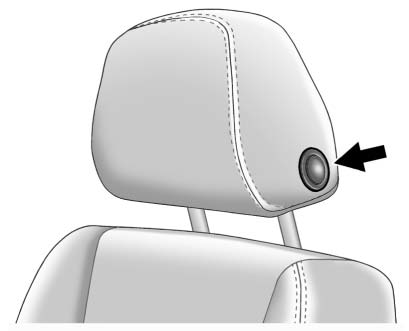
To raise or lower the head restraint, press the release button located on the side of the head restraint and pull up or push the head restraint down and release the button.
Pull and push on the head restraint after the button is released to make sure that it is locked in place.
The front head restraints are not designed to be removed.
Rear Seat
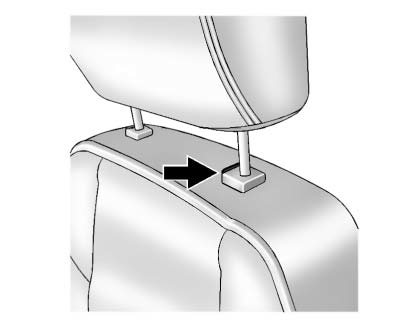
Pull the head restraint up to raise it.
To lower the head restraint, press the release button, located on the head restraint post on the top of the seatback, while you push the head restraint down.
Push down on the head restraint after the button is released to make sure that it is locked in place.
If you are installing a child restraint in the rear seat, see “Securing a Child Restraint Designed for the LATCH System” under Lower Anchors and Tethers for Children (LATCH System) .
See also:
Radio Data System (RDS)
The audio system has a Radio Data
System (RDS). RDS features are available
for use only on FM stations that broadcast
RDS information.
With RDS, the radio can do the following:
• Seek to st ...
Passing
The driver of a vehicle about to pass another on a
two-lane highway waits for just the right moment,
accelerates, moves around the vehicle ahead, then
goes back into the right lane again. A simple
...
Storing a Station as a Favorite
Up to 36 preset stations can be stored. Each page can store six preset stations.
The presets within a page can be from different radio bands.
To scroll through the pages, press the FAV 1-2-3 (favor ...