


Adjusting the Treble, Midrange, and Bass
Buick LaCrosse / Buick LaCrosse Owners Manual / Infotainment System / Introduction / Operation / Adjusting the Treble, Midrange,
and Bass
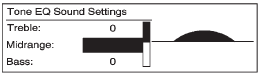
1. Press the TONE button.
2. Select Treble, Midrange, or Bass.
3. Select the value.
Press the  BACK button to go
back to the Tone Settings menu.
BACK button to go
back to the Tone Settings menu.
See also:
Driving Through Flowing Water
CAUTION:
Flowing or rushing water creates strong
forces. If you try to drive through flowing
water, as you might at a low water
crossing, your vehicle can be carried
away. As little as six inch ...
Wipe Parking
If the ignition is turned to LOCK/ OFF while the wipers are on 1, 2, or
, they will immediately stop.
If the windshield wiper lever is then moved to
before the driver door is opened, or
within 1 ...
Remote Vehicle Start
For vehicles with this feature, the engine can be started from outside the vehicle. ...